
Learn how to use Yahoo Pipes and TwitterFeed to keep your Twitter followers up to date on your latest blog posts and anything else you happen to be up to on the internet.
You can get a glimpse at the end result by paying a visit to @foobot, my personal robot slave. There are several improvements I want to make, so he should be considered as 'in beta' for the meantime. As I add features I will add other parts to this tutorial series.
Let's get started, shall we?
Step 1: Create a fresh Twitter account
This step is entirely optional. Consider how your followers will react to receiving automated tweets - many will feel like they're being spammed. In the final stage of this guide you will be able to control how many tweets-per-hour get fed to your Twitter account, but I chose to create a separate account. You will need a different email address for each new Twitter account you create, but you should have no other problems.It's going to be handy to be able to post messages manually to this account. Twhirl makes it easy to manage multiple Twitter accounts. Alternatively TwitterBar lets you post directly from your Firefox address bar.

Step 2: Yahoo Pipes
'Pipes is a powerful composition tool to aggregate, manipulate, and mashup content from around the web' according to the blurb. It's also surprisingly simple to use, so don't be overwhelmed by all the options - we're not going to try anything complicated. If this is your first time watch the quick video 'Learn how to build a pipe'.You'll need a Yahoo account if you don't have one. When you're all set, click 'Create a pipe' at the top. You should be presented with this:

The menus at the top lets you name your pipe and the left hand menu contains all the modules you can use to create and manipulate your feeds. Lets drag the 'Fetch Feed' module into the main window. Now we'll need an RSS feed. In this example, I've taken my del.icio.us feed. The easiest way to grab the RSS URL is to right click on the link and select 'Copy link location' (or similar, depending on browser). Paste that into our module.
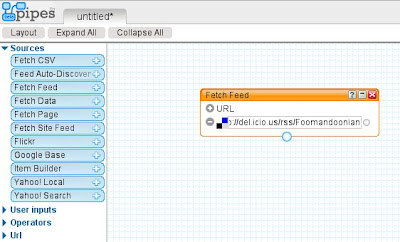
Ta-da. If you select that box and look in the debug window you can see the feed output. Repeat this for all the feeds that you want to broadcast on Twitter.Now we need to join all these feeds together, using the 'Union' module (under 'Operators'). Then wire the output of that up to the 'Sort' module. Sort should update itself so the dropdown menu has all of the relevant attributes. We are going to sort by item.pubDate in descending order. Wire that up to the 'Pipe Output' module, and we should have a working feed. Click on the screenshot below to take a closer look at what you should have:
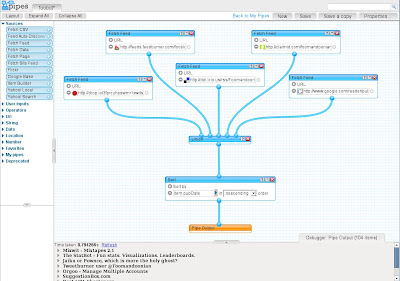
Make sure your pipe is saved and click the 'Run pipe...' link at the top. This will take you to a page that displays the appearance of the RSS feed and gives you a multitude of ways to put it to use. We just need to grab the feed from the dropdown menu at the right and keep it handy for step 3...Step 3: TwitterFeed
Finally, we need to get our RSS feed into Twitter, and this is exactly what TwitterFeed does.

You'll need an OpenID to sign into TwitterFeed. I like ClaimID, but it makes no odds which one you use. I don't think a step-by-step guide is necessary here as the process is so simple: Enter your Twitter login info; your RSS feed and how often you want TwitterFeed to tweet.I chose to include only the RSS titles in my tweets, and I like my URLs to be shortened with TweetBurner. Consider if you want your automated tweets to have a special prefix so your followers can tell which updates are automated (A good idea, but since I'm using a special account for this, I didn't see the need). Finally, make sure the 'active' checkbox is checked and go ahead and click 'Create'.
Step 4: Wait...
That's it, we're done for now. You may have to wait a while for your first update, and there is no guarantee that every single item in your feed will be tweeted, but I think we're off to a good start.Check back for part 2 later. In the meantime you're most welcome to subscribe to my RSS feed, or join me on Twitter.
Tags: beta, robotslave, twitter
Mixwit simply lets you produce a mixtape out of whatever music you can find via seeqpod, skreemer or just as plain mp3's on the interweb, and embed them as a snazzy widget on your webpage. Well, you can see how cool it looks below...
The process was really simple - just search for tunes and drag the ones you like from the results list to your playlist. I rather liked the default templates, but you can upload your own image to truly customise the look of your tape. I didn't need give out my email address or sign up to anything to produce the widget above, although doing so would let me go back and edit the tape in the future. If you write a music blog, this would make a great sidebar widget.
So, another little service that does something simple, incredibly well.
Just as I was calling it a night, I noticed on Summize that the term Jaiku is trending. From what I can gather, most of the posts are Brazilian and they seem to be dissatisfied with Twitter and leaving en masse for Jaiku. Here is a translation of the results page, updated in real time.
Orgoo describes itself as 'your personal communications cockpit'. In real terms this means that you can send and receive email through multiple accounts, through a single inbox (unless you use free Microsoft or Yahoo webmail). It similarly collates all your IM accounts and uses Joopz to let you send SMS messages (in the US and Canada). The interface is one of the cleanest I have used - It's as polished as Yahoo Mail but with more of the simplicity of Gmail.

Sadly Orgoo won't become my 'personal communications cockpit' for a while yet, for the simple fact that I would have to pay for my Hotmail and Yahoo services to make it really valuable, and those accounts are not worth the money. Pidgin is a more robust IM client too. I am forever opening and closing Firefox, and I suspect this is pretty common behaviour, so I like to have an IM running constantly in the background and not taking up a tab in my browser.
Also, in my tests Orgoo was deadly slow. It took forever to load up my Gmail inbox and then to view the individual messages. This may well be because of heavy load due to the sudden influx of new users from TechCrunch and the like. There are privacy issues to consider too as you will be trusting this one small company with a lot of your account information and personal data.
That said, I have six invites to hand out. Send your email address to foomandoonian (at) orgoo.com, and I'll shoot out invites to the first six requests I get.
TinyURL is the original URL shortener. The service is very simple - take a long URL like:
http://omnomnom.files.wordpress.com/2008/01/chihuahua.jpg
and make a much tinier URL, like: http://tinyurl.com/3qyjpe. TinyURL offers several additional features that are standard for most URL shortener services, including 'preview' links (eg: http://preview.tinyurl.com/3qyjpe) and bookmarklets, so you can streamline the process of creating short URLs.
So that's all pretty simple, right? Why would you want to use one of the many copycat services? Well, as with my other round-ups this one is not going to be comprehensive. Instead, here are a selection of URL shorteners that have some genuine value add. Still too much text? Skip to the end. Enjoy.

is.gd is one of my favourites. It produces some of the shortest URLs (eg. http://is.gd/mdt). Users can see a preview page by appending a hyphen to the URL (eg. http://is.gd/mdt-). You are also free to add any hints you like, after another "/", for example: http://is.gd/mdt/meow.
snipurl, snurl or snipr.com, by contrast with is.gd, makes a simple service seem complicated. They have tons of features, and I hate to do them a disservice, but I wasn't prepared to create an account for something that is so non-critical. If you need Excel integration, RSS feeds, support forums, 'multi snips', privacy keys and tons of other features, check them out. Example url: http://snipurl.com/2atwu.
memurl tries to generate mnemonic URLS, like http://memurl.com/kepumi.
doiop.com lets you pick a keyword (provided you can find a unique one) to produce more memorable URLs: http://doiop.com/flyingrat. It seems short of other features though.
icanhaz.com does the same as doiop, but with extra LOLcat, making for some amusing URLs: http://icanhaz.com/schrodinger. You have the option of entering your email address so you can edit your URLs later, but I could see no way of logging in. Just to be safe, I would advise against it.moourl.com's unique selling point seems to be 'cuteness'. It also has the option to personalise your URL. http://moourl.com/hownow. And it is cute!
Metamark can also generate custom URLs. A typical URL is http://xrl.us/tortoisefail, but that link will fail unless the user knows to append the password (in this case, add: -fail)
notlong.com is the only one I found that actually uses a custom subdomain, allowing you to create URLs like http://kingarthur.notlong.com. It also, by default, gives you a password to access your stats and manage the URL. One of the neater shortening services!
TweetBurner caters to the Twitter market by giving you stats associated with your account, and making it easy to tweet your twurl (!). Again, the bookmarklet simplifies the process. Typical URL: http://twurl.nl/5wucdf.HURL.WS is hosted on Google, so won't go down unless Google does. The URLs are not the shortest (eg. http://www.hurl.ws/7y) but it does let you check how many people have clicked through one of your links by appending /hits - for example: http://www.hurl.ws/7y/hits.
urlTea is open source and has some extra funkyness. Typical URL: http://urltea.com/38vd. You can also append descriptive info to the URL after a question mark, http://urltea.com/38vd?like_this.
Finally, LinkBunch does something a bit different and creates a short URL for multiple links: http://linkbun.ch/dw1. It does mean that users have to be routed through a special linkbun.ch page, but there are many useful applications that make this compromise worthwhile.
In conclusion...
Use is.gd to keep it simple and short. Use Tweetburner if you use Twitter. Use notlong if you want the URL to look semi-professional.TechCrunch on Twitter. Nothing much to add, except the comments are great - in fact I think I'm now sold on the benefits of video commenting.
Muxtape quite simply lets you roll your own mp3 mixtape on the internet to share with others.
The social networking features are pretty basic too. You can add anyone else's Muxtape to your list of favourites and you can explore a random selection from the front page. Last.fm this is not. Take a look at my muxtape to see the player in action.
A nice alternative is altertone, which is very slick looking and open source, but lacks the minimalism of Muxtape.
One final note worth mentioning is the official Muxtape blog. There was a short service outage over the last few days and this kept the users very well informed - something that Twitter has only just figured out!
Tags: open source, social, software
We Heart It is a simple image bookmarking site, without the elitism of Ffffound. The service stands out because it keeps things simple and does things well.
After signing up, be sure to add the bookmarklet to your browser. Then it is just a matter of clicking a button, and optionally tagging and writing a comment on the We Heart It site. The tagging makes it easy to find similar images. You can choose to filter out NSFW content and there are rudimentary social networking features, but that in itself is no weakness. There is also the usual RSS feed so you can export your discoveries to your tumblelog or wherever.
I'm going to be writing about several other sites that serve a small niche but do it very well this week, so stay tuned for some more high quality discoveries.
Twitter is going a little nuts over a new social network called Pheltup, with people clamouring for invites. It's a hoax people, pure and simple. I'm a Web 2.0 geek and was at first seduced by the sexy logo and bold colour palette, but read on and you'll see why you should keep your email address to yourself.
If you're not a member you don't get to take a look at what's going on inside (at least not yet) leading people no alternative but to speculate. The site only hints vaguely, saying on the front page that it is "The first social network that not only tells you WHO is doing WHAT; but also WHY." Wired posted a short piece saying "This is what we know about Pheltup: It's probably an elaborate inside joke."
Wired also notes that WhoIs information shows that the domain was registered on the 21st of May, saying "Could a social network spring up overnight? Not likely." The WhoIs gives no other clues, but does reveal that the company Pheltup.com are based in Vancouver.
Sources for more information are currently pretty scarce. There is a Pheltup account on Twitter, a thread on Get Satisfaction and a room on FriendFeed for people wanting an invitation.
If it is a hoax, as Wired suggests, then they have persuaded a lot of others to play along, including Nick Douglas and Scott Beale. Neither journalist has blown the whistle, but Laughing Squid could just be playing along. In fact no source from the inside has yet written a review or provided any screenshots or anything concrete.
Mike Monteiro has probably done the most to convince me that this is all a big joke. In various tweets he 'reveals' that big Twitter users Zappos and Will Wheaton have an account (although they haven't mentioned Pheltup themselves) and hints at some cool 'tutorials' feature and something called a 'socialspirograph' (which sounds very cool, or could be utter nonsense). Mike's bio says 'You have fair warning that I will lie to you'. Also his most recent posts (after the teasing) say ' Got ONE. First-come, first-served.' then '...and there it goes.' So was the lie a lie? I give up...
Some users are utterly convinced it's just a wind up, including Aaron Muszalski: 'That's it. I'm fed up with pheltup. They were cool 20 hours ago, but now, between the downtime, the privacy holes and this TOS kerfluffle...'
Even the initial David McCreath and Merlin Mann tweets link to jokey URLs like:
pheltup.com/mike_ftw/cupcakes/taxonomy/om/nom/nom/nom/,
pheltup.com/bayareatraffic, and pheltup.com/pantiefight (age verification req'd)
So I had to go around in a few circles to come to this conclusion, and now I feel like a big dork because the clues were right there from the start. The ultimate question seems to be, is it just a friendly poke at social networking addicts who 'must have an invite' or a scam to harvest thousands of email addresses from a very specific demographic?
Update
Simon Wistow gets the joke. Last year he 'created' Flume, a similarly vague 2.0ish site, big on hype, low on detail.It would appear that Pheltup is running off the same technology that the stillborn Flume did. I believe it was originally called "Smoke and Mirrors" but has been renamed "Bullshitr" for marketing purposes.
He gives more of the story here.
In a perfect link with my post about useful Twitter applications from earlier today, Get Satisfaction have just announced a new service called Overheard:
Get Satisfaction's powerful Overheard feature enables you to support customer conversations across the Web by bridging the Twitter stream to your Get Satisfaction community. Hear what your customers are saying, and respond to them in a channel they are already using. Simply set the keywords you want to track, and you'll see all the messages on Twitter ("tweets") that match your search terms. See someone you want to reach out to or a customer idea worth exploring? Turn that tweet into a topic and quickly bring the rest of the Get Satisfaction network into the conversation.
Get Satisfaction have built a fantastically useful website built around a concept so simple and brilliant it's staggering to me that it hadn't been done before. Essentially it's a tech support forum, linking customers with companies, including Twitter.
Get Satisfaction is a direct connection between people and companies that fosters problem-solving, promotes sharing, and builds up relationships. Thousands of companies use this neutral space to support customers, exchange ideas, and get feedback about their products and services. Get Satisfaction is open, transparent, and free. You’re free to ask, free to answer, and free to start a new conversation. Everyone is invited and encouraged to participate: companies, employees, customers — anyone with an opinion, an answer, or something to say.
Overheard is powered by Summize. The company or individual simply runs a search on the company name and identifies an issue. They can then get a topic started on Get Satisfaction:
The topic starting page makes you narrow the problem down over several stages until it is well defined. It even estimates the likelihood of the discussion getting noticed once it is posted! Presumably this could also be an ideal forum for companies to steal away customers of their competitors who are less web savvy! All in all, this use of Twitter is probably smarter than any of the others I listed earlier.


